
Systems · AI & Agents
Zeus
My Linux development workstation, which also serves local LLMs to my coding agents, runs image generation and acts as a CI runner. One GPU and one pool of RAM are shared across all of it, with cgroup limits and Grafana telemetry showing what limits each workload.
Active · 2026
vLLM · CUDA · Nix · Grafana
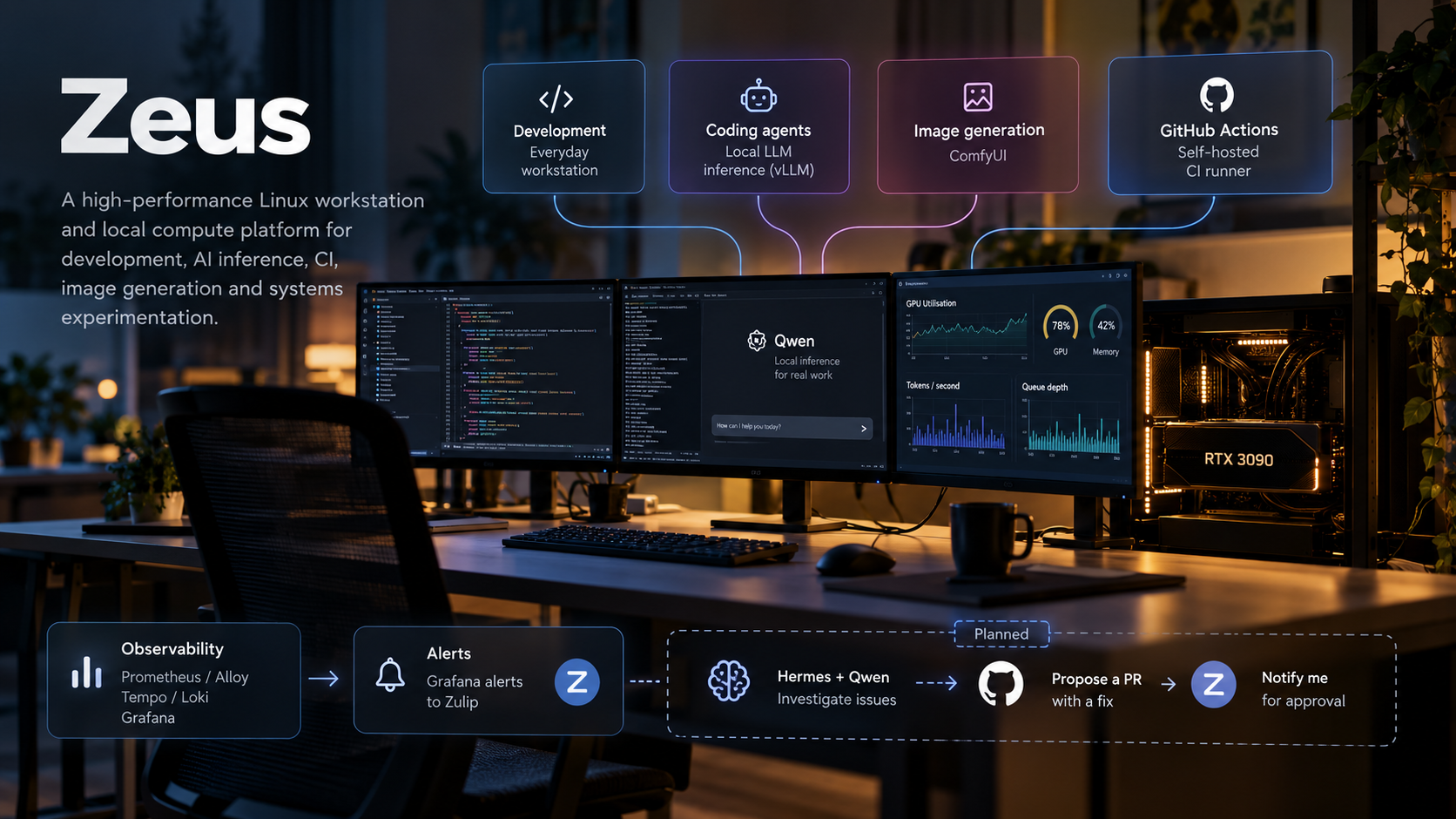
Zeus is the machine I write software on. It is also where my coding Coding agent An AI model given tools to edit files and run commands, so it can carry out a programming task end to end instead of only suggesting code. get their model, where images get generated, and where a GitHub Actions runner The program that executes a GitHub Actions workflow: it takes a job, checks out the repository and runs each step. GitHub hosts runners in the cloud; a self-hosted runner is your own machine, labelled so only chosen jobs land on it. builds and tests one of my repositories. It runs Ubuntu 24.04 with a Niri A scrollable-tiling Wayland compositor: the program that places windows in a Linux graphical session. Windows form an infinite horizontal strip you scroll through, rather than a grid you resize. Wayland session for day-to-day development, and local LLM Large language model. A model trained on a lot of text to predict the next token, which is what chat assistants run on. are served on the same box behind an OpenAI-compatible API The chat HTTP interface OpenAI popularised, now the default way tools talk to a language model. Any client built for it can be pointed at a different base URL, so a local server can stand in for the hosted one.. The default backend is now Strata, running Swift 1.5 Flash Next: a 125B-class mixture-of-experts model that keeps most of its expert weights in the machine’s 192 GB of RAM and a hot subset on the GPU. When I need images rather than text, ComfyUI An open-source application for generating images from diffusion models such as Stable Diffusion. A job is wired as a graph of nodes, load model, encode prompt, sample, decode, and the graph runs on the GPU. takes over the GPU.
I built it to answer questions I couldn’t answer from a hosted API. How practical is good local inference on consumer hardware? Can one machine be a pleasant workstation and a model server at the same time? When throughput disappoints, what is actually the limit: compute, memory bandwidth, the KV cache Short for key-value cache. As the model reads a prompt it stores the keys and values it computed for each token, so later tokens don't redo that work. It grows with context length and shares VRAM with the weights., batching, the CPU or scheduling? And can a local model serve an interactive coding agent well enough that I stop reaching for the cloud?
Those turned out to be the easy half. Once Zeus was doing all of it, the question changed from whether the hardware can run these workloads to how they should share it safely and predictably. Most of what I’ve built since is an answer to that: a deliberate switch for the GPU, resource limits for CI Continuous integration. A server builds and tests every push, so problems show up before code is merged., protection for the terminals my agents run in, and enough telemetry to see what is going on.
Why run models locally
Hosted models are convenient, and for plenty of work they are the right choice. Running locally buys something different: prompts and code never leave the machine, I choose the model, the Quantisation Storing a model's weights with fewer bits, for example 4 instead of 16. The model gets smaller and faster to read from memory, at some cost in accuracy. and the serving flags, and I can see and change every layer between a request and the GPU. The marginal cost of another request is electricity, which makes it cheap to run experiments I wouldn’t pay per token for. None of that makes local inference cheaper in general. A GPU sitting idle costs money too.
Architecture
The machine is an AMD Ryzen 9 9950X with 192 GB of DDR5 in four 48 GB DIMMs, 4 TB of NVMe storage and one NVIDIA RTX 3090 with 24 GB of VRAM Video RAM, the GPU's own memory. The RTX 3090 has 24 GB, and the weights, the context and working buffers all have to fit in it.. I sized the power supply and cooling for sustained inference rather than bursty desktop use, and left room for a second GPU.
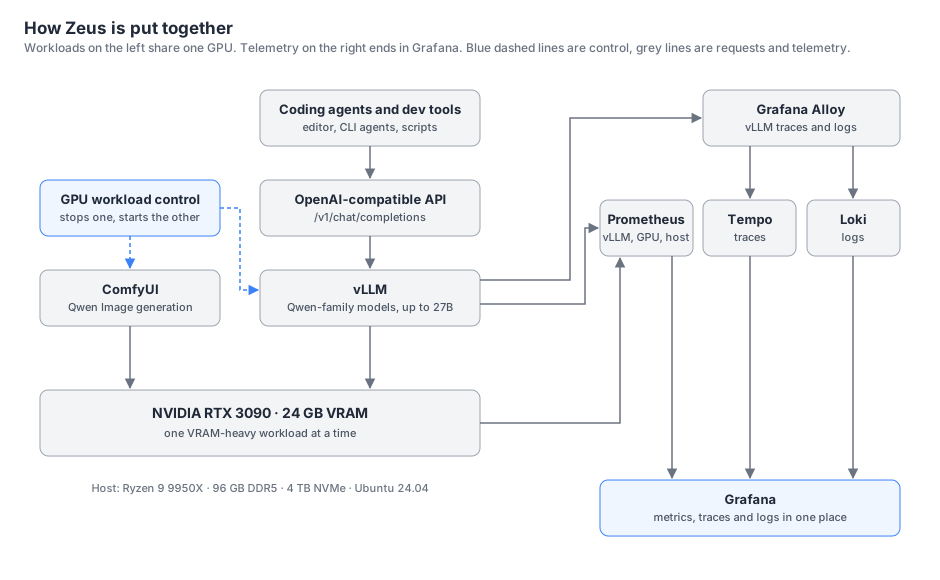
There are four parts. Clients speak the OpenAI API, so any tool that can point at a base URL can use a local model without knowing it is local. Several backends can serve that API, and a small control layer decides which GPU-heavy workload runs at any moment. Everything else, from the editor to CI, competes for the same CPU, memory and disk, so it gets resource policy rather than a switch. Telemetry leaves the machine for a separate Grafana Dashboards and alerting for metrics, logs and traces. It stores none of the data itself; it queries the other tools in the stack and draws their answers side by side. stack, and alerts from it reach me in Zulip Open-source team chat in which every message belongs to a topic inside a stream. A discussion about one incident stays together as it grows, instead of scrolling away in a busy channel..
Serving local models
vLLM An open-source server for running large language models (LLMs) on GPUs. The v comes from the virtual-memory technique it uses to manage the context. It handles memory, batching and speculative decoding. used to be the whole answer here. It still serves the Qwen-family models, including the 27B fast build from [swift-qwen3.8-rtx3090](/projects/swift-qwen3-8-rtx3090), and it stays installed as an alternative. The default backend since October 2026 is Strata, serving Swift 1.5 Flash Next with its experts in host RAM, and [ai.liamwh.com](https://ai.liamwh.com) fronts it through Open WebUI. The host is on my tailnet, so the link only resolves for me. The OpenAI-compatible endpoint is what makes any of this practical: coding agents, editor integrations and scripts all talk to Zeus the same way they would talk to a hosted provider, and swapping backends is a server-side change.Coding agents are a demanding workload for a single consumer GPU. They send long prompts full of files and tool output, they reuse most of that prompt on every turn, and they need a large Context window How many tokens the model can see at once, including the whole conversation so far. 114k tokens is a few hundred pages of text. for long sessions. That shapes most of the serving choices: how much VRAM goes to weights and how much to the KV cache, whether Prefix caching Reusing the KV cache an earlier request already computed for a prompt prefix it shares, instead of prefilling that part again. Agents resend almost the same prompt every turn, so the saving is large. pays off, and which quantisation keeps quality while leaving room for context. swift-qwen3.8-rtx3090 is one piece of work that came out of this: rebuilding the Speculative decoding A cheap drafter guesses several tokens ahead and the full model checks them all in one pass. The model keeps the correct guesses and throws away everything from the first wrong one onwards. parts of a 27B model so it runs faster on this GPU.
Adding Strata
After months of work on dense 27B models I wanted to know what a much larger model would do to my daily work. Swift 1.5 Flash Next is a 125B-class mixture-of-experts model. It is far too large to sit in 24 GB of VRAM as weights, but only a fraction of its experts are active per token, so an engine that keeps the expert weights in host RAM and caches the hot ones on the GPU can still serve it quickly. That became realistic when I took Zeus from 96 GB to 192 GB of DDR5.
Making it the default changed more than a model swap usually would. The engine needed a Nix-managed serving layer, a unit in the GPU arbitration group and the same authenticated port 8090 the other backends use. Open WebUI had to learn which backend owns that port. Home Manager’s service activation had to stop quietly restoring the previous boot default. The full account, including the CUDA and packaging failures and every measurement, is in strata-swift-flash-next-rtx3090.
What it buys me is headroom. A 262,144-token context, decode around 100 tokens per second on coding prompts, and one backend that agents, the web UI and scripts share.
Sharing the GPU
LLM serving and image generation both want most of the 24 GB. vLLM reserves a fixed share of VRAM up front for weights and KV cache Short for key-value cache. As the model reads a prompt it stores the keys and values it computed for each token, so later tokens don't redo that work. It grows with context length and shares VRAM with the weights., Strata fills a large expert cache on the card while pinning the rest of the weights in RAM, and an image pipeline has its own large working set. Running two at once would mean shrinking one of them until neither is useful.
So I don’t try. Five GPU-heavy workloads are declared on Zeus, Strata, Swift-Qwen, syv-vLLM, llama.cpp and ComfyUI, and their systemd units carry mutual conflicts: starting one stops the others, so exactly one holds the card. Switching is an explicit operation rather than something that happens when two processes collide and one of them fails to allocate.
Backend selection, service lifecycle and credentials belong to the machine’s declarative configuration. The units, launch profiles and switching wrappers come from Home Manager, and the backends draw their API key from the same SOPS-managed local LLM secret, with llama.cpp keeping its own. Open WebUI orders itself after the inference units without requiring them, so restarting the web UI can never drag a backend onto the GPU I had deliberately given to something else.
That bluntness is affordable for one resource. CPU, memory and disk can’t be handed over one workload at a time, because the workstation is in use throughout.
A workstation first
Zeus is still my primary development machine. My user environment is managed with Nix Home Manager A tool that declares a user's whole environment, shells, editors, CLI tools and their config files, in one place. Applying a change rebuilds that environment instead of patching it by hand. on top of Ubuntu, so shells, editors, CLI tools and their configuration are declared rather than accumulated, and I can rebuild the environment instead of repairing it. Everything else has to live alongside that without taking it over. A model server or a CI job that makes the editor stutter would defeat the point of the project.
CI and resource isolation
Zeus is also a self-hosted GitHub Actions runner for one private repository: Cargo builds and tests, tests that start containers, and image builds, with a warm sccache A compiler cache for Rust and C++. It stores the results of finished compilations and reuses them when the inputs have not changed. A warm cache already holds most of what the next build needs.. A fast local machine suits all of that, and all of it can starve an editor. The runner is an unprivileged account with no access to my home directory, and pull-request and fork workflows never select it.
Its systemd Linux's first process and its service manager. It starts each service as a unit and gives every one its own cgroup, and that cgroup tree is what resource limits and oomd's kill decisions hang off. unit encodes the priority. CPU and IO weights of 25 and a nice value of 10 make interactive work win under contention, and because they are weights rather than quotas, CI still gets the whole machine when it is idle. Memory has two ceilings: at 26 GB the kernel starts reclaiming from the runner, and at 34 GB a runaway build is killed inside its cgroup A Linux control group. The kernel arranges processes into a tree of groups and accounts for, and can limit, the CPU, memory and disk IO of each. systemd gives every service and app its own. instead of taking the desktop with it.
Ceilings on CI weren’t enough, because they cover only CI. On 1 September the whole machine locked up. Both Swap Overflow memory on disk. When RAM fills, the kernel moves cold pages there to keep going. Disk is orders of magnitude slower than RAM, and a machine living in swap can feel frozen while nothing has formally failed. devices had been full for over 13 hours and load was above 400, yet nothing was killed. The kernel’s out-of-memory killer doesn’t fire while compressed-swap reclaim keeps slowly succeeding, and systemd-oomd A daemon that watches memory pressure and swap use per cgroup and kills the worst offender before the machine locks up. The kernel’s own out-of-memory killer often acts too late, or not at all. was running with no cgroup it was allowed to act on. The runner’s ceiling had held. The freeze was the sum of everything else.
I told oomd to kill the cgroup using the most swap once swap passed 90 per cent. The next day it did exactly that, and killed Herdr, the background server that hosts the terminals my coding agents run in. Herdr itself was using about 156 MB. But my launcher had started it in a single cgroup together with the terminal window and two browsers, so oomd saw a 61 GB victim and took the whole session, agents included. The policy was right and the cgroup layout was wrong.
Fixing the layout took more than one round. Each pane now starts in its own systemd scope, so a kill takes out one pane’s process tree rather than the session. Three more kills over the following days showed that moving a process to another cgroup doesn’t move the memory already charged to it, so Herdr’s server was still blamed for swap its panes had used. Panes therefore enter their scope at birth, and Herdr’s service is barred from swap, restarts without limit and has a watchdog. CI overlapped with some of those kills but wasn’t needed to cause them: the terminals alone held tens of gigabytes.
Under real memory exhaustion, oomd should now kill one leaf cgroup, such as a pane, a browser or a CI job, and leave the rest alone. I’ve verified the containment on live panes: stopping one pane’s scope killed only that pane, and a memory-capped scope was killed in isolation. I haven’t yet run a full exhaustion test on a machine I use every day.
None of this is about capacity. Zeus has enough hardware for each of these workloads. The work is deciding who yields.
Observability and alerts
nvidia-smi tells me the GPU is busy. It doesn’t tell me whether that busyness is useful. A GPU can report near-full utilisation while requests queue, the KV cache is full and each new Token A chunk of text the model reads and writes, usually a word or part of one. Speed, context length and output are all counted in tokens. waits on memory bandwidth rather than compute. Utilisation says a kernel was running, not how much work it did.
To see the difference I collect telemetry from the inference backends, the GPU and the host. Zeus runs only the collectors: the serving backend’s /metrics endpoint, where Strata exports the same metric names vLLM uses, NVIDIA’s DCGM exporter NVIDIA's collector for GPU metrics: utilisation, memory, temperature and power. It publishes them in the format Prometheus scrapes. DCGM stands for Data Center GPU Manager. and node_exporter Prometheus's collector for Linux host metrics: CPU, memory, disks, network. One runs on each machine you want to watch. for metrics, and Grafana Alloy A collector agent. It gathers a machine's logs, traces and metrics and forwards them to whatever backend it is pointed at. On Zeus it ships vLLM's traces and logs to the stack on the other host. for vLLM’s traces and logs. Prometheus A monitoring database. It pulls metrics from targets on a schedule, stores them as time series, and evaluates alert rules against them, such as VRAM above 90 per cent for five minutes., Tempo Grafana's trace database. A trace records the spans of one request through a system, and Tempo keeps them so a slow request can be followed step by step after the fact., Loki Grafana's log database. It indexes only the labels attached to a log stream, not every word in it, which keeps it cheap to run; the contents are searched when you query them. and Grafana run on a separate always-on host in my home network, as a single grafana/otel-lgtm container that also monitors everything else I self-host. A slow request can be followed from its trace into the logs around it, and the history is still there when Zeus is the machine in trouble. Grafana is the one place I look at all of it.
The dashboards are organised around relationships rather than single numbers:
- Queue depth and concurrency against KV-cache utilisation. When the cache fills, vLLM can’t admit more requests, and queueing grows even while the GPU looks busy.
- Prompt throughput against output throughput. Prefill Reading the prompt. Every prompt token is processed in one parallel pass before the first output token is written, so a long prompt delays the start of the answer no matter how fast the output is afterwards. and Decode Generating the answer one token at a time after the prompt has been read. Decode speed is measured in tokens per second. stress the GPU differently. Agent workloads are prefill-heavy, and prefix-cache hits change that balance.
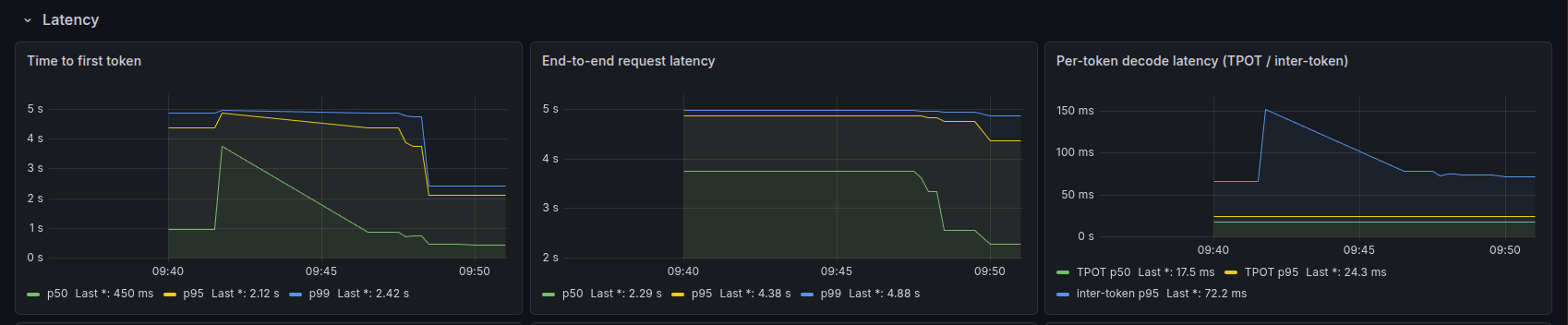
- Time to first token against end-to-end latency. Time to first token How long a request waits before its first output token arrives. It covers queueing and prefill, so a slow start with fast output points at the beginning of the request rather than the middle. tracks queueing and prefill. Time per output token (inter-token latency) tracks decode. Which one dominates end-to-end latency says where to look.
- GPU utilisation, VRAM, temperature and power against all of the above. These show whether the hardware is the constraint or just the thing that is visibly busy.
- CPU, memory and host health. Zeus is a workstation and a CI runner as well, so I need to know when inference is slowing down everything else, and the reverse.
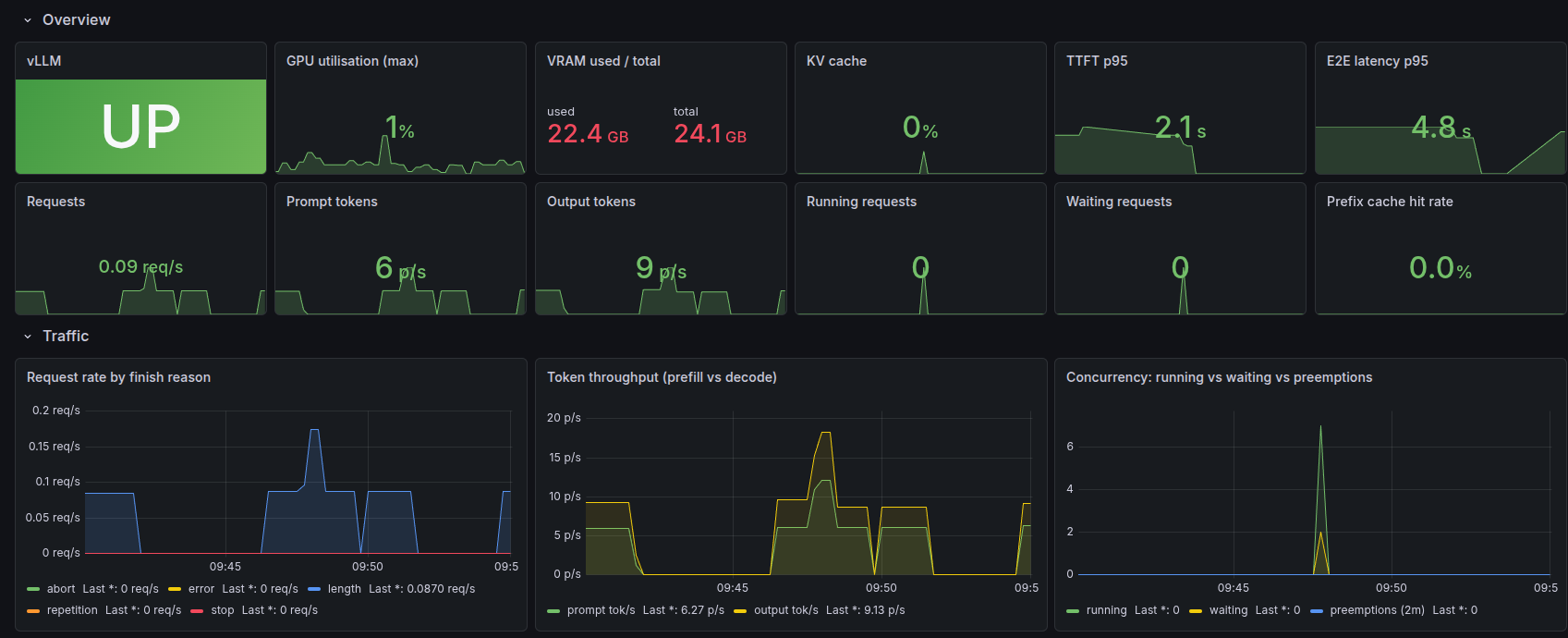
A dashboard only helps while I’m looking at it, so Grafana alert rules post to Zulip as well. They run on the same telemetry, and the firing and resolved messages for an alert share one topic, so an incident reads as a single thread. The same alerts also go to Telegram, so an outage of Zulip itself can’t stay silent. That moves the stack from something I inspect to something that tells me when to look.
Host rules for a machine going down and for memory pressure cover Zeus like any other host. Seven more are specific to inference: the backend being down, GPU over-temperature, VRAM headroom, KV-cache pressure, a request backlog, time to first token and preemptions. The thresholds are plain Prometheus rules, Grafana does the routing, and each alert gets its own Zulip topic. The backend-down rule has to know about GPU arbitration. An inference backend being off while ComfyUI or another backend holds the card is normal, so it fires only when nothing is holding the card.
These dashboards are the measurement layer for the experiments I publish from Zeus.
Current baseline
What the two backends do today, one command apart:
| measure | value |
|---|---|
| Strata decode, coding prompts | 88 to 100 tokens per second |
| Strata time to first token, 247k prompt | 107.7 s, marker retrieved |
| Strata configured context | 262,144 tokens |
| Swift-Qwen decode, MTP long context | 98.4 tokens per second |
| Swift-Qwen VRAM under load | 22,225 MiB of 24 GB |
| Swift-Qwen TTFT, short burst | p50 450 ms, p95 2.12 s |
| Swift-Qwen time per output token, burst | p50 17.5 ms, p95 24.3 ms |
The Strata rows come from the strata-swift-flash-next-rtx3090 benchmarks. The Swift-Qwen rows come from swift-qwen3.8-rtx3090, except the latency rows, which are read off the dashboard screenshots above; the burst was a handful of concurrent requests, not a load test, so treat those as a sanity check rather than a capacity figure. I have not run the two backends against each other on matched tasks, and the Strata write-up explains what such a comparison would need. I haven’t yet measured a controlled concurrency sweep on either backend.
What’s next
None of this is done yet. There are three directions.
More compute. The next experiment is one GPU against two. I plan to add another high-VRAM NVIDIA card, and the platform was built with that in mind. The comparison is Tensor parallelism Splitting each layer of a model across several GPUs, so the weights live in their combined memory. A model too large for one card runs this way at all, at the cost of the cards passing data on every step. serving of one model against independent workers each serving their own, measured on throughput, TTFT, long-context behaviour, concurrency, power draw and real coding-agent sessions. Around that I want to compare model sizes and quantisation strategies on the same workloads, and find where local models hold up in real agent sessions and where they don’t.
Better isolation and scheduling. Switching between LLM serving and image generation is still manual, and I’d like something that decides for me. The resource policy is reactive too. The limits come from peaks I’ve observed, CI containers have no memory ceiling of their own, and I still owe the machine a proper memory-exhaustion test when I can take it out of daily use.
Closing the operational loop. This is the piece that was still a plan when I first wrote about Zeus, and it now exists. Hermes, an open-source agent runtime, runs on Zeus as an unprivileged user that listens in Zulip. A firing alert from the trusted Grafana integration wakes it. It starts a session, queries Prometheus, Loki and Tempo through read-only tools, reads the infrastructure repository in a rootless Podman A container engine like Docker, but without a root daemon. Rootless mode runs a container as an ordinary user, so even a container that breaks out has that user's permissions and no more. sandbox, and if a repository change is the answer, opens a draft pull request. Diagnosis and PR go back into the same Zulip topic, and I approve or reject. Investigations run on the local inference backend with no hosted fallback: if the local model is down, the loop posts the alert context and a telemetry summary and marks it as needing a human.
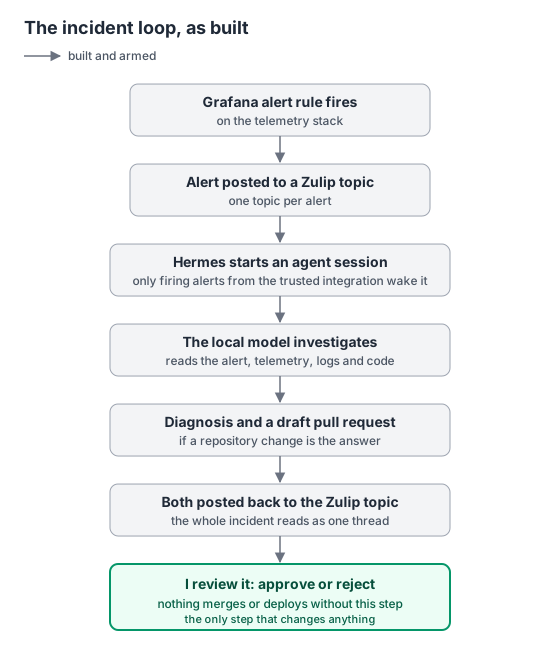
Whether the local model is good enough at diagnosing its own host is still the open question, which is why remediation stops at a draft PR for review. Everything up to that point runs on its own.
I’ll publish the results as write-ups with the measurements behind them.